Tin tức tổng hợp, web site tin tức

Kênh thông tin giải trí hàng đầu

Tin tức trong nước 24 giờ qua được cập nhật thường xuyên và nóng hổi

Cùng tim hiểu, khám phá những dang lam thắng cảng Việt

Những Danh lam thằng cảnh tuyệt đẹp, nơi sưu tầm những danh lam thắng cảnh đẹp nhât hiện nay

Những khu du lịch sinh thái đẹp nhất

Du lịch Việt, Những danh lam thắng cảnh đẹp nhất

Du lịch Biển đẹp

Tham gia những tuor du lịch tới mọi miền thế giới

Khám phá thiên Nhiên kì thú

Cùng tham gia khám phá những bí ẩn thiên nhiên kì thú

Thứ Sáu, 11 tháng 3, 2011

Tạo nút Top page ( lên đầu trang ) cho blog

 Khi trang web hay blog của bạn quá dài thì việc phải  thường xuyên kéo thanh trượt lên đầu trang  nhiều khi sẽ làm cho người xem phiền lòng , vì thế để giảm thiểu điều này bạn nên thêm vào một nút Top page ( lên đầu trang ) . Vào Bố Cục > Thêm Tiện ích > HTML/JavaScript và dán đoạn code dưới đây vào .
<a style="display:scroll;position:fixed;bottom:20px;right:5px;" href="#" title="Lên trên"><img src="  LINK ẢNH  "/></a>

Bạn có thể thay thế hình ảnh và các thông số cho phù hợp với sở thích và blog của mình . 

Code tra từ điển Online


<span id="hottext">Tra Từ Điển Online</span><font color="#ffff00">&nbsp; </font>
<font color="#66ff33">
<script>

var theItemCount = theSummaries.length;
startTicker();
</script></font><font face="Tahoma">
</font><p>
<font face="Tahoma">

<font face="Tahoma">
</font></font></p><form action="http://vdict.com/gateway.php" target="_blank" name="vdict" method="get">
<font face="Tahoma"><font face="Tahoma"> </font></font><p align="center">
<font face="Tahoma"><font face="Tahoma"><input id="word" maxlength="50" value="Nhập Từ Cần Tra Vào Đây!VD: chiase-vanthuc" class="tborder" name="word" size="21" type="text"/>&nbsp;&nbsp;&nbsp; &nbsp; &nbsp;&nbsp;<select class="tborder" name="dictionary" size="1">
<option value="0"/>All dictionaries
<option selected="selected" value="1"/>Anh - Việt
<option value="2"/>Việt - Anh
<option value="3"/>Việt - Việt
<option value="4"/>Việt - Pháp
<option value="5"/>Pháp - Việt
<option value="6"/>Từ điển Tin Học
<option value="7"/>English - English
</select>&nbsp; &nbsp;&nbsp;&nbsp;&nbsp;</font></font></p>
<font face="Tahoma"><font face="Tahoma"> </font></font><p align="center">
<font face="Tahoma"><font face="Tahoma"> &nbsp;<input value="Dịch từ" class="tborder" name="Submit" type="submit"/></font></font></p>
<font face="Tahoma"><font face="Tahoma"></font><font color="#0080ff">

<script language="javascript">
function openpage(pageurl, pagename, pagewidth, pageheight)
{
var attr;
attr="width="+pagewidth+",height="+pageheight+",scrollbars=no,status=yes,title=yes,toolbars=no,resizable=no"

window.open(pageurl, pagename, attr);

}

</script>
</font>
</font></form>

Blog chiase-vanthuc


Lưu ý : chỉ sử dụng trên Google Blogger và các dịch vũ blog có hỗ trợ HTML và javascript tốt , không dùng được trên blog của Yahoo

Chèn Windows Media Player vào blog

Cách này sử dụng rất tốt trên Google Blogger cũng như các blog hỗ trợ tốt HTML khác .

1 . Code dùng để chèn Video
<embed pluginspage="http://www.microsoft.com/Windows/Downloads/Contents/Products/Med&#13;&#13;&#10;iaPlayer/" src="Link đến file video" width="320" height="285" type="application/x-mplayer2" showstatusbar="1" showdisplay="false" AutoStart="0" ClickToPlay="1" showcontrols="1" playcount="10" enablecontextmenu="false" enabled="-1" windowlessvideo="0" stretchtofit="0" uimode="full" mute="0" volume="100" currentmarker="0" loop="true" fullscreen="0" controls="controlpanel" />


2 . Code dùng để chèn Audio


<OBJECT id=winMediaPlayerID codeBase=http://activex.microsoft.com/activex/controls/mplayer/en/nsmp2inf.cab#Version=6,4,5,715 type=application/x-oleobject height=45 standby="Loading Microsoft Windows Media Player components..." width=250 classid=CLSID:6BF52A52-394A-11D3-B153-00C04F79FAA6 name=winMediaPlayer><PARAM NAME="URL" VALUE="LINK ĐẾN FILE AUDIO"><PARAM NAME="rate" VALUE="1"><PARAM NAME="balance" VALUE="0"><PARAM NAME="currentPosition" VALUE="0"><PARAM NAME="defaultFrame" VALUE="0"><PARAM NAME="playCount" VALUE="999"><PARAM NAME="autoStart" VALUE="0"><PARAM NAME="currentMarker" VALUE="0"><PARAM NAME="invokeURLs" VALUE="-1"><PARAM NAME="baseURL" VALUE=""><PARAM NAME="volume" VALUE="50"><PARAM NAME="mute" VALUE="0"><PARAM NAME="uiMode" VALUE="full"><PARAM NAME="stretchToFit" VALUE="-1"><PARAM NAME="windowlessVideo" VALUE="0"><PARAM NAME="enabled" VALUE="-1"><PARAM NAME="enableContextMenu" VALUE="0"><PARAM NAME="fullScreen" VALUE="0"><PARAM NAME="SAMIStyle" VALUE=""><PARAM NAME="SAMILang" VALUE=""><PARAM NAME="SAMIFilename" VALUE=""><PARAM NAME="captioningID" VALUE=""><PARAM NAME="enableErrorDialogs" VALUE="0"><PARAM NAME="_cx" VALUE="6615"><PARAM NAME="_cy" VALUE="1191">
<EMBED type="application/x-mplayer2" id="wmpEmbed" pluginspage="http://www.microsoft.com/Windows/MediaPlayer/" src="LINK ĐẾN FILE AUDIO" name="MediaPlayerTV" height="45" width="250" AutoSize="1" AutoStart="0" ClickToPlay="1" DisplaySize="1" EnableContextMenu="0" EnableFullScreenControls="1" EnableTracker="1" Mute="0" PlayCount="999" ShowControls="1" ShowAudioControls="1" ShowDisplay="0" ShowGotoBar="0" ShowPositionControls="1" ShowStatusBar="1" ShowTracker="1">
</EMBED></OBJECT>


Nếu bạn chọn AutoStart ="1" thì chương trình sẽ tự động chơi Video . Rất mong được nhận ý kiến từ các bạn

Chèn các kênh truyền hình trực tuyến vào blog

Code chèn các kênh truyền hình trực tuyến vào blog mà không cần code phức tạp chỉ cần chèn frame

<iframe src="http://fun.easyvn.com/_easyweb/web/design/tivi1.php" frameborder="0" width="450" height="450"></iframe>

Chèn thông tin chứng khoán vào blog

Code chèn thông tin chứng khoán vào blog

<p align="center"><table width="180">


<table border="1" cellpadding="0" cellspacing="0" width="180">


<tbody>


<tr>


<td rowspan="2" width="17%" align="center"> <font face="Arial"> <span>Mã CK </span> </font> </td>


<td rowspan="2" width="18%" align="center"> <font face="Arial"> <span>TC</span></font></td>


<td colspan="2" height="23%" align="center"> <font face="Arial"> <span>Khớp lệnh </span> </font> </td>


<td rowspan="2" width="22%" align="center"> <font face="Arial"> <span>+/-</span></font></td></tr>


<tr>


<td width="21%" align="center"> <font face="Arial"> <span>Giá</span></font></td>


<td width="22%" height="20" align="center"> <font face="Arial"> <span>KL</span></font></td></tr>


<tr>


<td colspan="5" height="20" align="center"><font face="Arial"> <span>


<iframe scrolling="no" frameborder="0" width="180" src="http://vnexpress.net/User/ck/hcms/HCMStockSmall.asp" name="ifrmContent" height="200"></iframe> <br/>


</span></font></td></tr>


</tbody></table></table></p>

Chèn ô comment ngay dưới bài viết

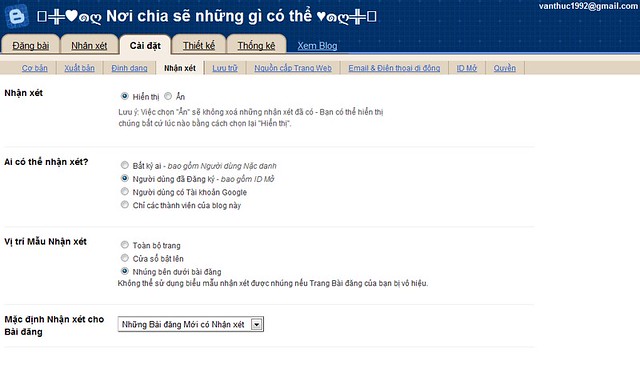
Trước tiên hãy vào http://draft.blogger.com trong phần Cài đặt ,mở tab Nhận Xét


sau đó chọn vào Bài đăng dưới đây đã được nhúng trong phần Vị trí Mẫu Nhận Xét
imageSau đó lưu lại là xong bây giờ bảng comment đã xuất hiện trong blog của bạn rồi đó .
Còn nếu chưa xuất hiện nữa thì bạn hãy vào Chỉnh Sửa HTML ( nhớ lưu lại template phòng trường hợp bị hư còn có thể phục hồi ) , chọn Mở Rộng Mẫu Tiện Ích , rồi kiếm dòng :
<p class='comment-footer'> 
<b:if cond='data:post.allowComments'>
<a expr:href='data:post.addCommentUrl'
expr:onclick='data:post.addCommentOnclick'>
<data:postCommentMsg/></a> </b:if> </p>


thay thế toàn bộ những dòng đó bằng :


<p class='comment-footer'>
<b:if cond='data:post.embedCommentForm'>
<b:include data='post' name='comment-form'/>
<b:else/>
<b:if cond='data:post.allowComments'>
<a expr:href='data:post.addCommentUrl' expr:onclick='data:post.addCommentOnclick'><data:postCommentMsg/></a>
</b:if>
</b:if>
</p>


Sau đó nhấp vào Lưu Mẫu và mở blog bạn lên để xem kết quả .


Còn nếu không được nữa thì hãy tìm dòng sau :

<b:include data='post' name='comments' />

thay thế bằng :

<b:include data='post' name='comment-form'/>


Cuối cùng là lưu lại . Chúc bạn thành công

Tạo “mưa tuyết” bằng JavaScript

Bạn muốn thấy cảnh mưa tuyết rơi rơi trên trang Web của mình? Xin mời bạn “xắn tay áo” và gõ vào máy đoạn mã JavaScript sau đây (bạn nhớ lưu thành dạng văn bản có phần mở rộng là .html). Các bông tuyết được vẽ bằng công cụ Airbrush trong Microsoft Paint, kích thước 10x10 pixel, lưu thành tập tin blue_snow.gif. Chương trình có thể chạy được trên cả Internet Explorer 4.0 và Netscape Navigator 4.0 trở lên.

PHP Code:
<html>
<head> <title> Mua tuyet </title> </head>
<body> <center>
<SCRIPT LANGUAGE="JavaScript1.2">
<!-- Begin
var no = 25; var speed = 10;
var snowflake = "blue_snow.gif";
var ns4up = (document.layers) ? 1 : 0;
var ie4up = (document.all) ? 1 : 0;
var dx, xp, yp; var am, stx, sty;
var i, doc_width = 800, doc_height = 600;
if (ns4up) {
doc_width = self.innerWidth;
doc_height = self.innerHeight;
} else if (ie4up) {
doc_width = document.body.clientWidth;
doc_height = document.body.clientHeight;
}
dx = new Array(); xp = new Array();
yp = new Array(); am = new Array();
stx = new Array(); sty = new Array();
for (i = 0; i < no; ++ i) {
dx[i] = 0;
xp[i] = Math.random()*(doc_width-50);
yp[i] = Math.random()*doc_height;
am[i] = Math.random()*20;
stx[i] = 0.02 + Math.random()/10;
sty[i] = 0.7 + Math.random();
if (ns4up) {
if (i == 0) {
document.write("<layer name=\"dot"+ i +"\" left=\"15\" ");
document.write("top=\"15\" visibility=\"show\"><img src=\"");
document.write(snowflake + "\" border=\"0\"></layer>");
} else {
document.write("<layer name=\"dot"+ i +"\" left=\"15\" ");
document.write("top=\"15\" visibility=\"show\"><img src=\"");
document.write(snowflake + "\" border=\"0\"></layer>");
}
} else if (ie4up) {
if (i == 0) {
document.write("<div id=\"dot"+ i +"\" style=\"POSITION: ");
document.write("absolute; Z-INDEX: "+ i +"; VISIBILITY: ");
document.write("visible; TOP: 15px; LEFT: 15px;\"><img src=\"");
document.write(snowflake + "\" border=\"0\"></div>");
} else {
document.write("<div id=\"dot"+ i +"\" style=\"POSITION: ");
document.write("absolute; Z-INDEX: "+ i +"; VISIBILITY: ");
document.write("visible; TOP: 15px; LEFT: 15px;\"><img src=\"");
document.write(snowflake + "\" border=\"0\"></div>");
}
}
}
function snowNS() {
for (i = 0; i < no; ++ i) {
yp[i] += sty[i];
if (yp[i] > doc_height-50) {
xp[i] = Math.random()*(doc_width-am[i]-30);
yp[i] = 0;
stx[i] = 0.02 + Math.random()/10;
sty[i] = 0.7 + Math.random();
doc_width = self.innerWidth;
doc_height = self.innerHeight;
}
dx[i] += stx[i];
document.layers["dot"+i].top = yp[i];
document.layers["dot"+i].left = xp[i] + am[i]*Math.sin(dx[i]);
}
setTimeout("snowNS()", speed);
}
function snowIE() {
for (i = 0; i < no; ++ i) {
yp[i] += sty[i];
if (yp[i] > doc_height-50) {
xp[i] = Math.random()*(doc_width-am[i]-30);
yp[i] = 0;
stx[i] = 0.02 + Math.random()/10;
sty[i] = 0.7 + Math.random();
doc_width = document.body.clientWidth;
doc_height = document.body.clientHeight;
}
dx[i] += stx[i];
document.all["dot"+i].style.pixelTop = yp[i];
document.all["dot"+i].style.pixelLeft = xp[i] + am[i]*Math.sin(dx[i]);
}
setTimeout("snowIE()", speed);
}
if (ns4up) {
snowNS();
} else if (ie4up) {
snowIE();
}
// End -->
</script> </body>
</html> 
( theo Internet)

 
bep dien tu, bep dien, bep tu,bep hong ngoai,Bếp điện từ, Bếp hồng ngoại, Bếp điện ,Bếp từ giá rẻ, Bếp từ, Bếp điện từ giá rẻ, bếp điện từ, bếp điện, bếp từ bếp điện từ bếp điện máy lọc nước bếp hồng ngoại
-------------------------------------- linhtuty